How I work with AI: a Sway desktop built for Claude Code and OpenCode
This is how I work with AI coding agents every day: one project per
workspace, an agent in a terminal on each, and a desktop that tells me
which agent is waiting for me. Below are the config and helper scripts I
have built up on a laptop (Debian 13, Sway 1.10, one external monitor).
Everything is plain bash or Python plus swaymsg and
jq. Config and scripts are linked at the bottom. Take what
is useful, tell me what you would do differently.
What it is built around
Claude Code is my main tool and the whole setup is built around it;
OpenCode (with free models) runs on one workspace next to it. Each
workspace is one project folder with Claude Code running inside Neovim
(the claudecode.nvim plugin), in a foot terminal. In the shared scripts
that launch line is plain nvim; swap in whatever you run.
Browsers have fixed jobs:
- qutebrowser, one per workspace. Every HTML page
Claude Code makes for me (reports, question pages, mind maps) opens with
qb-here, which walks the process tree from the terminal to its window and opens the page in the qutebrowser of that same workspace, with its own profile folder. Pages never land on the workspace I happen to be looking at. - Firefox shows a local low-code app that holds my CRM and my knowledge base.
- Vivaldi is there so Claude Code can use the internet when headless browsing and a scraping service cannot get the page.
Because of that, a session is a set of projects, each usually a terminal next to a browser, not a set of apps.
Screens
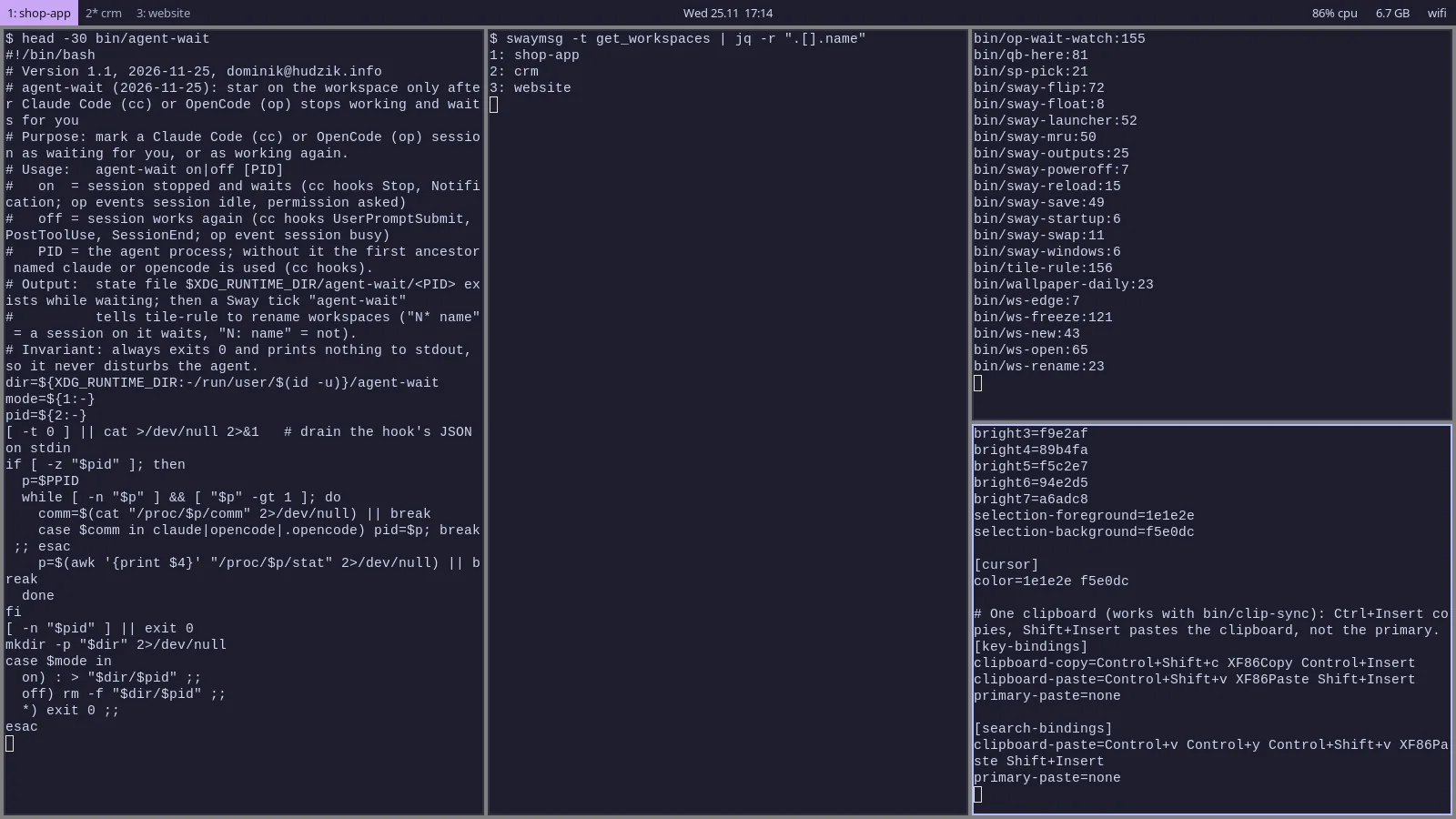
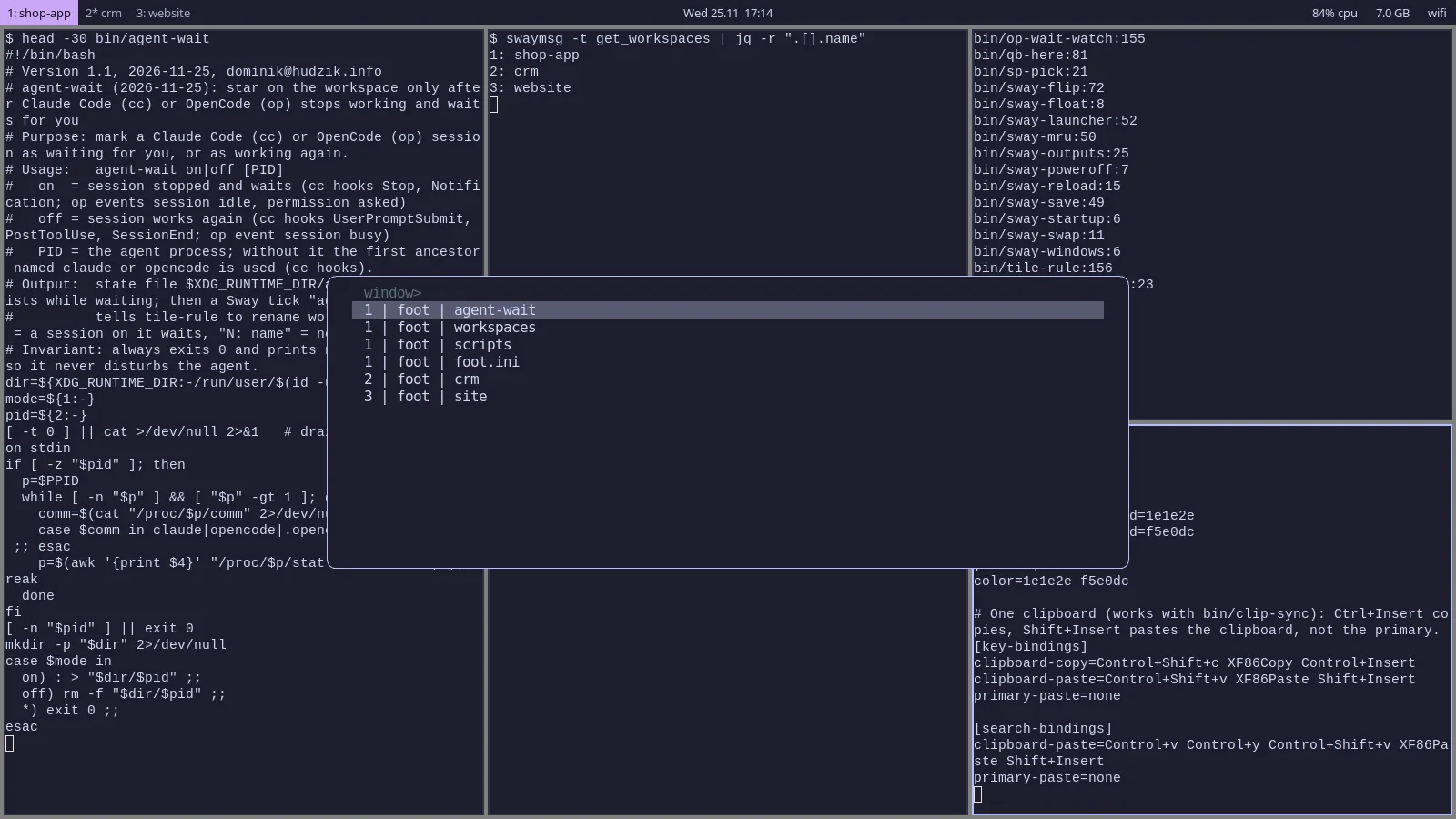
Made in a clean nested Sway with the config from the repository, so no client data is on them.

The workflow
I keep one folder per workspace and want my layout back after a login, and I want to see at a glance which agent needs me. These do that:
- Mod+1 ... 0 (or the numpad) switches workspace. If
the workspace is empty,
ws-openstarts the apps saved for it (terminal in the right folder, browser, editor), in the saved columns and widths. - Mod+Ctrl+s (
sway-save) saves what is open now: folder, app kind, column and row, width in percent. It saves only the workspaces that have windows right now, so closing the ones you do not want before saving is how you pick a session. Ctrl+Alt+F4 saves and powers off. - Login runs
ws-open allfromsway-startup, so the saved session comes back. - Mod+Ctrl+n (
ws-new) lists every workspace number you ever used, with the folder last used and the date (a*marks the open ones). Pick a number, confirm or change the folder, and it opens workspace "N: folder" with an editor in that folder. The history file is never pruned, so a workspace you used months ago is still on the list. Mod+Shift+n (ws-rename) renames the current workspace after the folder open in the focused window. - Mod+Ctrl+z freezes a workspace
(
ws-freeze): SIGSTOP to the process trees behind the windows on the focused workspace, SIGCONT on the next press. Frozen windows are dimmed. Terminals and processes that also own windows on other workspaces are skipped. RAM stays used but the CPU does not. Good for a heavy browser on a laptop with 8 GB. Read the warning below before you use it. - A
*shows which agent waits for me. A workspace is named "3: myproject" while the agent on it works and "3* myproject" when it has stopped and waits for my input. With several agents running I see on the bar where I am needed, without clicking through. The workspace I am looking at never gets a star. How it works:agent-wait on|off [PID]keeps a small state file per agent while it waits and sends Sway a tick.- Claude Code: hooks call it:
StopandNotification= waiting,UserPromptSubmit,PostToolUseandSessionEnd= working.cc-wait-hooks-addadds the hooks to~/.claude/settings.json(backup and diff first). - OpenCode: its plugins get no session events in the
version I use (2.4), so
op-wait-watch, a small systemd user service, reads the event stream of the local OpenCode service (/api/event): execution started = working, succeeded / failed / interrupted or a permission question = waiting. It finds the terminal by the session's folder. I have tested it withopencode runonly, not yet with a live TUI session. tile-rulereads the state files and renames the workspaces.
tile-ruledecides where a new window goes: the first three windows on a workspace sit side by side, the fourth and later open below. It replacedautotiling, which kept splitting in directions I did not want. It also renames each workspace to "N: folder" after the folder of the session running in it (setSESSIONat the top of the script to the process you run,claudeby default).
Other things I use every day: Mod+x swaps the focused window with the next one, Mod+Shift+space floats a window at 70% x 70% centred (and back), Mod+e flips horizontal/vertical for the window you are in, Mod+Ctrl+minus picks a window from the scratchpad in fuzzel.
Keys
Mod is the Super key. I override some Sway defaults: Mod+b (was
splith) and Mod+v (was splitv) are launchers, Mod+e runs
sway-flip instead of layout toggle split,
Mod+Shift+space runs sway-float instead of
floating toggle, Mod+q closes the focused window and
Mod+Shift+q closes the whole workspace, Mod+Shift+c checks the config
before it reloads.
Windows
- Mod+h j k l: focus. Mod+Shift+h j k l or arrows: move the window
- Mod+x: swap with the next tiled window
- Mod+f: fullscreen. Mod+Shift+space: float 70% x 70% centred, or back to tiled. Mod+space: focus floating/tiled
- Mod+q: close the focused window. Mod+Shift+q or Mod+Ctrl+q: close every window on this workspace, no confirmation
- Mod+r: resize mode (h j k l, Esc)
- Mod+minus / Mod+Shift+minus: show / send to scratchpad.
Mod+Ctrl+minus: pick a scratchpad window in fuzzel
(
sp-pick)
Layout
- Mod+Ctrl+v: next window below. Mod+Shift+v: next window beside
- Mod+s stacked, Mod+w tabbed, Mod+e flip horizontal/vertical
(
sway-flip), Mod+a focus parent
Workspaces
- Mod+1 ... 0 or numpad: go to workspace (restores its saved apps if empty). Mod+Shift+1 ... 0 or numpad: move window there
- Mod+Tab: back to the previous one. Mod+Left / Mod+Right: previous / next. Mod+Up / Mod+Down: first / last existing
- Mod+Ctrl+n: new workspace with folder (
ws-new). Mod+Shift+n: rename after the folder (ws-rename) - Mod+Ctrl+s or Mod+Shift+g: save session
(
sway-save) - Mod+Ctrl+z: freeze / wake the apps on this workspace
(
ws-freeze)
Switching and launching
- Alt+Tab: previous window, most recently used first
(
sway-mru) - Alt+Shift+Tab or Mod+Shift+Tab: window list in fuzzel, workspace
number first, exact search (
sway-windows) - Mod+b: all apps, last launched first. Mod+v: only the apps in a
recent list you curate by hand (
sway-launcher) - Mod+Return: terminal (foot). Mod+n: file manager. Mod+Shift+w: Wi-Fi picker (nmtui in a small floating terminal)
System
- Ctrl+Alt+v: clipboard history (cliphist + fuzzel, text and images). Ctrl+Alt+Shift+v: delete an entry
- One clipboard:
clip-synccopies every selection to the clipboard and back, so Ctrl+V, Shift+Insert and middle-click paste the same text - Ctrl+Alt+l: lock. Print / Shift+Print: screenshot (whole screen / selection, saved and copied)
- Mod+Shift+c: check the config with
sway -C, reload only if it is valid (sway-reload). Mod+Shift+e: log out (asks first) - Ctrl+Alt+F4: save the session, then power off
(
sway-poweroff) - Volume, brightness, mute and media keys as printed on the keyboard
Scripts
| Script | What it does |
|---|---|
sway-save |
saves open windows (folder, kind, column, row, width %) to
workspaces.map, and every folder ever used to
workspaces.history |
ws-open |
starts the saved apps for workspace N (or all, or
l to list), only if N is empty |
ws-new |
fuzzel list of every workspace number ever used, then opens it with an editor in a folder |
ws-rename |
renames the focused workspace to "N: folder" from the focused window |
sway-startup |
login: restores the saved session |
ws-freeze |
freezes / wakes the apps behind the focused workspace, terminals skipped |
tile-rule |
three windows side by side, the fourth and later below; names
workspaces after their folder, * while an agent waits |
agent-wait |
marks an agent as waiting or working (called by hooks and by
op-wait-watch) |
cc-wait-hooks-add |
adds the Claude Code hooks that call agent-wait |
op-wait-watch |
OpenCode: reads the local service's event stream, calls
agent-wait (systemd user unit in config/) |
qb-here |
opens a URL in the qutebrowser of the workspace the calling terminal sits on |
sway-mru |
most-recently-used window switch (daemon follows focus events) |
sway-windows |
fuzzel window picker with workspace number first |
sp-pick |
fuzzel picker for scratchpad windows |
sway-launcher |
app launcher ordered by last start, --recent for a
curated list |
sway-swap, sway-flip,
sway-float |
swap two windows, flip split direction, toggle a centred 70% float |
sway-reload |
validates the config, reloads only if it is valid |
sway-poweroff |
saves the session, then powers off even if the save fails |
clip-sync |
keeps the primary selection and the clipboard the same |
sway-outputs |
external monitor present: laptop panel off; none: on (follows hotplug) |
ws-edge, bat-min,
wallpaper-daily |
first/last workspace, battery minutes for waybar, one wallpaper per day from a folder |
Script samples
Three short scripts from the repository, comment headers cut. The rest are in bin/.
agent-wait
Marks a Claude Code or OpenCode session as waiting or working. The hooks call it; it walks up the process tree to find the agent and tells tile-rule to put the star on the workspace.
dir=${XDG_RUNTIME_DIR:-/run/user/$(id -u)}/agent-wait
mode=${1:-}
pid=${2:-}
[ -t 0 ] || cat >/dev/null 2>&1   # drain the hook's JSON on stdin
if [ -z "$pid" ]; then
  p=$PPID
  while [ -n "$p" ] && [ "$p" -gt 1 ]; do
    comm=$(cat "/proc/$p/comm" 2>/dev/null) || break
    case $comm in claude|opencode|.opencode) pid=$p; break ;; esac
    p=$(awk '{print $4}' "/proc/$p/stat" 2>/dev/null) || break
  done
fi
[ -n "$pid" ] || exit 0
mkdir -p "$dir" 2>/dev/null
case $mode in
  on) : > "$dir/$pid" ;;
  off) rm -f "$dir/$pid" ;;
  *) exit 0 ;;
esac
# drop files of agents that are gone
for f in "$dir"/*; do
  [ -e "$f" ] || continue
  [ -d "/proc/${f##*/}" ] || rm -f "$f"
done
swaymsg -t send_tick agent-wait >/dev/null 2>&1
exit 0
cc-wait-hooks-add
Adds the Claude Code hooks that call agent-wait, with a backup and a diff of settings.json first.
set -eu
s=$HOME/.claude/settings.json
d=$(date +%F-%H%M%S)
cp -p "$s" "$s.bak-$d"
tmp=$(mktemp)
jq --arg aw "$HOME/.local/bin/agent-wait" '
  def add(ev; mode):
    .hooks[ev] = ((.hooks[ev] // []) | map(select((.hooks[0].command // "") | startswith($aw) | not))
      + [{"hooks": [{"type": "command", "command": ($aw + " " + mode), "timeout": 5}]}]);
  add("Stop"; "on") | add("Notification"; "on")
  | add("UserPromptSubmit"; "off") | add("PostToolUse"; "off") | add("SessionEnd"; "off")' "$s" > "$tmp"
jq empty "$tmp"
diff -u "$s.bak-$d" "$tmp" > "$s.diff-$d" || true
cat "$tmp" > "$s"
rm -f "$tmp"
echo "backup: $s.bak-$d"
echo "diff:   $s.diff-$d"
jq -c '.hooks | keys' "$s"
sway-reload
Checks the config with sway -C and reloads only if it is valid, so a typo never leaves a broken desktop.
cfg=${1:-}
if [ -n "$cfg" ]; then out=$(sway -C -c "$cfg" 2>&1); else out=$(sway -C 2>&1); fi
rc=$?
if [ "$rc" -ne 0 ]; then
  notify-send -u critical "sway-reload" "config invalid, NOT reloaded: $(head -c 300 <<<"$out")" 2>/dev/null
  echo "sway-reload: invalid (rc=$rc): $out" >&2
  exit 1
fi
[ "${DRYRUN:-0}" = 1 ] && { echo "sway-reload: valid (dry run)"; exit 0; }
swaymsg reload >/dev/null && notify-send "sway-reload" "reloaded" 2>/dev/null
Known weak spots (an outside review found these, I have not fixed them all)
ws-freezeis a blunt tool. SIGSTOP on a process tree makes network connections time out on the far side, breaks audio streams and calls, and a frozen window does not redraw (the script dims it so you can tell). They stay stopped until you press Mod+Ctrl+z on that workspace again. A cgroup freezer (systemctl freezeon a user scope) would be cleaner. My older version froze workspace 9 automatically whenever it was hidden; I turned that off because it caught things I did not mean to stop.- Mod+Shift+q and Mod+Ctrl+q close every window on the workspace with no confirmation. I keep it on purpose. Rebind it if you do not want that.
- No lock on idle. Screens power off after 10
minutes, nothing locks. Add
swaylockto the swayidle line (andbefore-sleep) if you need it. - The blank mode binds keycodes 9 to 255 so the first key only wakes the screen. It is 250 generated lines, Ctrl+key chords are not caught, and it drops you out of resize mode.
sway-savereplaces the whole map. Pressing it right after login, before the restore has finished, saves a smaller session than you had.workspaces.map.prevkeeps one older copy.- Workspace names are hard-coded in the config,
ws-open,sway-startupandws-new. Change them in all four. - No lock around
ws-open: pressing Mod+1 twice very fast can start the apps twice. cliphiststores everything you copy in plain text under~/.cache/cliphist, including copies from a password manager, andclip-syncnow sends every text selection there too. Filter or clear it.- Folder names:
ws-open,sway-save,ws-newandws-renameonly accept folder names made of letters, digits and. _ / + @ % : = ~ -. Spaces and quotes are rejected on purpose, because the command line goes through sway's ownsh -c.
Gotchas I hit
- Sway's environment has no
~/.local/binin PATH. Use full paths in bindings, and for windows you start from scripts putenv PATH=$HOME/.local/bin:\$PATHin front of the command. - A
swaymsg output ...that changes nothing still fires an output event. A subscribe daemon must act only when the state differs, or it loops. Mine looped for hours. - A reload re-runs
exec_alwaysand everyoutput * bgline. If a script sets the wallpaper once a day, a fixedoutput * bg #808080 solid_colorline wipes the picture on each reload. The shared config leaves that line out. Daemons that must start once (tile-rule,clip-sync) useexec, notexec_always. swaymsg workspace Nfor a missing workspace creates one named just "N", so named workspaces lose their names. Useworkspace number N.- A new window opens on the focused workspace, not on the one of the program that started it. Opening first and moving after makes it flash on the screen you are looking at. Work out the target workspace first.
- Waking from
output * power off: I bind every keycode in a "blank" mode so the first key press only wakes the screen and is not typed into a window. pkill -fmatches its own command line. Anchor the pattern or kill by pid.- Test config changes in a nested headless Sway
before they touch your live session, and let
sway -Ccheck the file before a reload.
Files
Config and scripts are one folder: config/sway-config,
config/waybar-config, config/waybar-style.css,
config/foot.ini, config/fuzzel.ini,
config/mako-config, and bin/ with the scripts
above. Theme is Catppuccin Mocha. Repository: https://github.com/hudzik/AI-setup
(folder sway/)
Dependencies (Debian package names where I know them): sway, swayidle, swaylock, swaynag (comes with sway), foot, fuzzel, waybar, mako-notifier, jq, python3, psmisc (pstree), procps (pgrep), upower, grim, slurp, wl-clipboard, cliphist, wlsunset, brightnessctl, playerctl, wireplumber (wpctl), network-manager (nmcli, nmtui), libnotify-bin (notify-send), yad, python3-i3ipc (for tile-rule), qutebrowser, thunar, firefox, neovim, policykit-1-gnome, gnome-keyring.
The config has no personal data in it, but before you use it: delete
the output lines for ports you do not have
(swaymsg -t get_outputs), set your keyboard layout and put
your own coordinates in the wlsunset line (the ones there are a
placeholder). The polkit path is the Debian one. The scripts are tested
on my machine only; read them before you bind them to keys.
Questions or your own setup
Questions about this setup, or do you use AI agents in the terminal in your own way? I would like to hear how. Write to me through the contact form.