Inbox to AI replies
Reads incoming email over IMAP, AI drafts a reply, a human reviews and sends it, and it goes back out over SMTP.

Why this works
1-minute demo on sample data
1-minute demo on sample data
3-minute demo on sample data
I'll train your employees to build and modify systems like this themselves.
1-minute demo on sample data
Paper documents slow a company down: letters waiting for the CEO's signature, invoices still to issue, documents spread across folders.
I built a document workflow system for a geodetic services company with 100+ staff that puts all of it in one place.
1-minute demo on sample data
Documentation, serial numbers, breakdowns, servicing, inspections.
Defining the changeover standard for switching a machine to another product • standard verification • forecasting changeover time for new products.
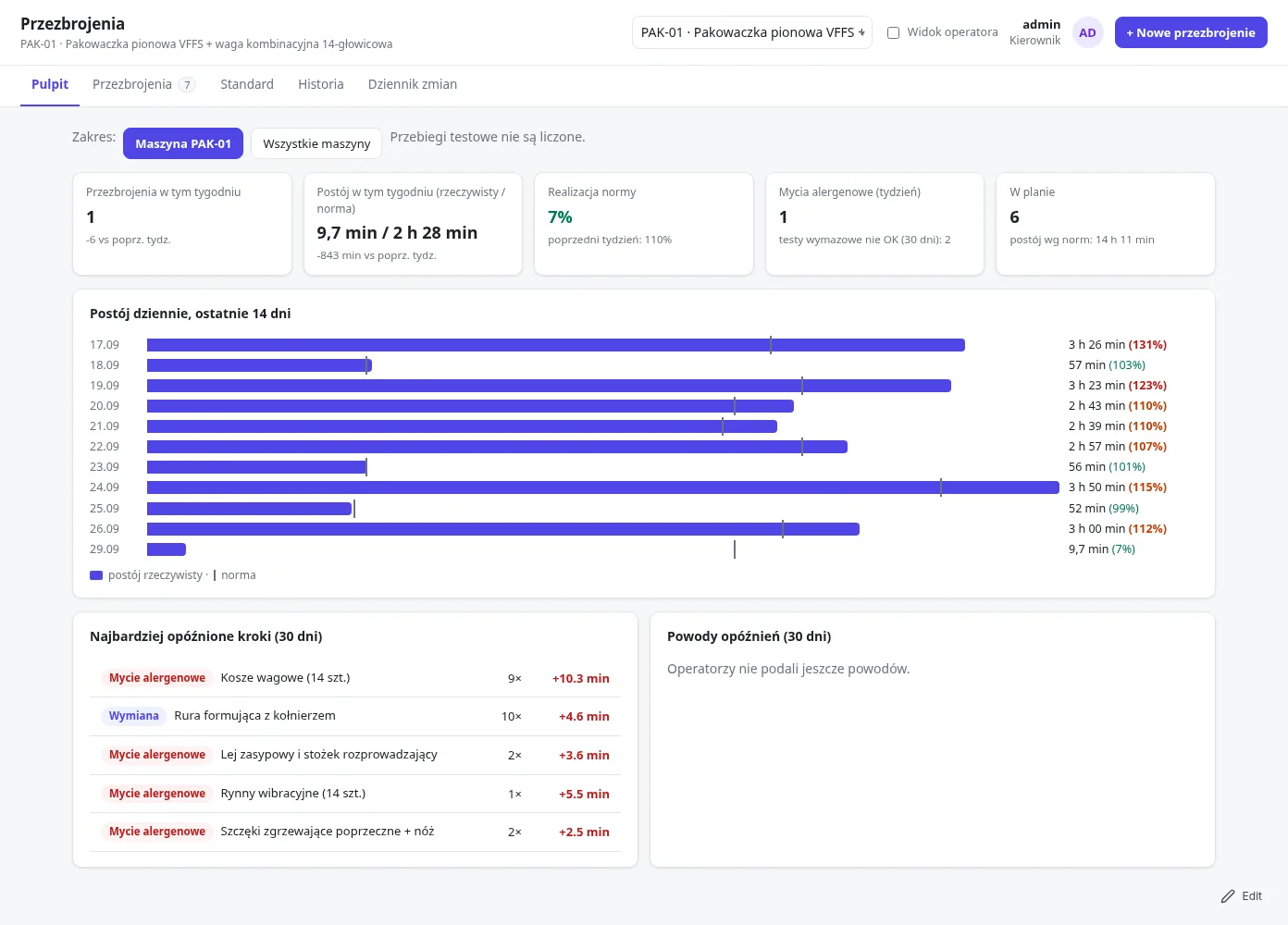
3-minute demo on sample data
In a cooperative bank, every employee has to know close to 30 regulations.
I built an app that makes it easy to check that employees meet this obligation.
Grants, trainees, installments, trainer availability, settlements with institutions.
Storage location, batch/delivery numbers, FIFO, mobile support.
Client portal: download PDF demo (5 pages)
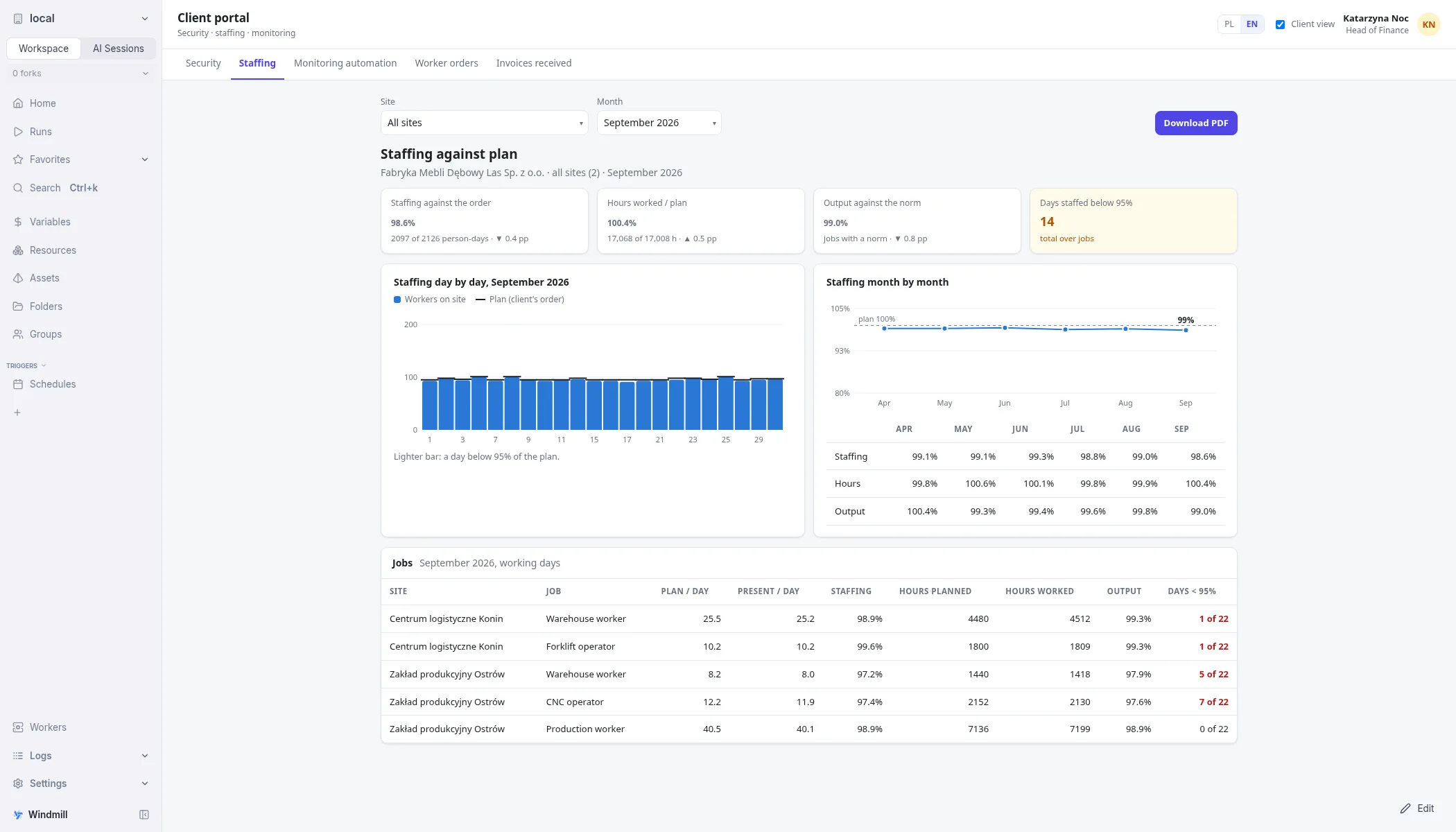
And there are some I can not reveal
I build systems that people actually enjoy using.
A few notes on the approach I take on projects:
Double-checking is the highest level of trust ;)
Reads incoming email over IMAP, AI drafts a reply, a human reviews and sends it, and it goes back out over SMTP.
Reads a company's files - emails, calendars, chats, drives, cloud storage - then AI drafts an offer. AI-supported OCR is available as an option.
Customers, projects and tasks in one PostgreSQL database that Claude Code works on directly. I ask in plain language: who should I contact today, who is waiting for an answer. A follow-up date can stay empty: the task waits until the customer gets back in touch.
Design of an internal AI assistant that runs entirely inside the bank's network: no cloud, no external AI, no internet connection. An employee uploads customer files, the model extracts the fields into a fixed structure, a Word template is filled and a PDF is created for the employee to approve. Status: proposed design for review.
What clients say
I happen to meet Dominik while interacting with one of our customers, and quickly realised he is a veteran who has helped tonnes of clients in setting up CRMs and automations. Over the course of a 2-month contract, Dominik organized around 40 meetings with potential users. Additionally, he was always active in our GitHub to raise relevant issues and suggested changes from a consulting perspective. Dominik is an excellent team member with good listening skills.
A Trainer 'with a capital T', which Dominik certainly is, knows how to keep any person interested. His knowledge of Google Ads is so extensive that even someone who doesn't have a professional need would appreciate these classes and learn a lot from them. Mega difficult knowledge conveyed in mega simple language is the ideal of training, isn't it?
Great job and looking forward to working on more projects.
Excellent Pipedrive advice, very friendly and helpful approach.
Because of the tools I use, prices are lower than you'd expect. Want to see for yourself?
Have a challenge or a problem? Drop me a line - I'll put together a demo with a solution for you.
Or email me directly at dominik@hudzik.info.
Or get in touch on LinkedIn.
sorry, but this part will be outdated by tomorrow :)
My LinkedIn posts and older blog notes. Click a title to read it.
This is how my AI agents talk to each other.
And how do yours talk?
Dominik's question: "what is released when bioethanol burns". Answer in Polish, short, so that it can be read quickly: (1) a table with row numbers (1.1, 1.2 ...): substance, roughly how much, is it harmful. Include: carbon dioxide and water vapour (complete combustion), and for incomplete combustion or poor quality fuel: carbon monoxide, aldehydes (e.g. acetaldehyde, formaldehyde), unburnt hydrocarbons, particles, and for fuel denatured with additives, the additives too. (2) The equation of complete combustion of ethanol. (3) How much CO2 and water vapour is produced per 1 litre of bioethanol, calculate from density (state the assumptions). (4) 3 practical conclusions about safety indoors (ventilation, CO detector, fuel without additives). Truthfulness: mark every statement 'verified' (give a source URL, check on the web with WebSearch or WebFetch) or 'guess'; say 'I do not know' if you cannot find it. Do not give exact concentrations without a source. Do not create files. The final answer at most 25 lines, no exclamation marks. If you do not know something about the purpose of the question (fireplace, stove, laboratory, engine), ask one numbered question with a recommended option, but still answer the general version.
The picture shows how AI agents talk to me.
Do you want a skill for Claude Code that makes this possible?
Write in a comment and I will gladly share it.
Tak moi agenci AI rozmawiają pomiędzy sobą.
A jak rozmawiają Twoi?
Pytanie Dominika: "co wydziela się podczas spalania bioetanolu". Odpowiedz po polsku, krótko i tak, żeby można było to szybko przeczytać: (1) tabela z numerami wierszy (1.1, 1.2 ...): substancja, ile mniej więcej, czy szkodliwa. Uwzględnij: dwutlenek węgla i parę wodną (spalanie całkowite), oraz przy spalaniu niepełnym lub złej jakości paliwie: tlenek węgla, aldehydy (np. acetaldehyd, formaldehyd), niespalone węglowodory, cząstki, a przy skażonym denaturatem także dodatki. (2) Równanie spalania całkowitego etanolu. (3) Ile CO2 i pary wodnej powstaje na 1 litr bioetanolu, policz z gęstości (podaj założenia). (4) 3 praktyczne wnioski o bezpieczeństwie w pomieszczeniu (wentylacja, czujnik CO, paliwo bez dodatków). Prawdomówność: przy każdym stwierdzeniu oznacz 'zweryfikowane' (podaj źródło z URL, sprawdź w sieci przez WebSearch lub WebFetch) albo 'domysł'; powiedz 'nie wiem', jeśli nie znajdziesz. Nie podawaj dokładnych stężeń, jeśli nie masz źródła. Nie twórz plików. Odpowiedź końcowa najwyżej 25 linii, bez wykrzykników. Jeśli czegoś nie wiesz o celu pytania (kominek, kuchenka, laboratorium, silnik), zadaj jedno ponumerowane pytanie z rekomendowaną opcją, ale i tak odpowiedz na ogólną wersję.
Obrazek pokazuje jak agenci AI rozmawiają ze mną
Chcesz skill dla Claude Code który to umożliwia?
Napisz w komentarzu - chętnie udostępnię.
I made a Claude Code skill that makes every session smarter than the last. I will share it with you for free.
Not a prompt. A skill: a file Claude loads and runs at the end of a work session.
It is called WRAP. When I say the session is done, the skill:
1. Reviews the session: what we did, what worked, what I corrected, and what Claude got wrong.
2. Saves the lessons as short rules, each with the reason, in the right place. Every project has its own folder, so rules specific to that project go to the CLAUDE.md in that folder. Rules about me and how Claude should work go to my global CLAUDE.md. Claude then finds them by itself when they match the task.
3. Updates or removes outdated entries instead of adding duplicates.
4. Offers a new skill when I repeated the same multi-step procedure. It creates it only after my "go".
5. Ends with a table: what was saved, where, and whether it is a new, updated or removed entry.
If nothing is worth saving, it says so. It does not invent notes.
The result: the next session starts with what the last one learned. I stop explaining the same thing twice.
Want it? Comment WRAP and I will send you the skill.
Yes, the mind map attached to this post was also made by a Claude skill.
Zrobiłem skill do Claude Code, dzięki któremu każda sesja jest mądrzejsza od poprzedniej. Podzielę się z Tobą za darmo.
To nie prompt. To skill: plik, który Claude ładuje i uruchamia na końcu sesji pracy.
Nazywa się WRAP. Gdy mówię, że sesja skończona, skill:
1. Przegląda sesję: co zrobiliśmy, co zadziałało, co poprawiłem i w czym Claude się pomylił.
2. Zapisuje wnioski jako krótkie reguły, każda z powodem, w odpowiednim miejscu. Każdy projekt ma swój folder, więc reguły specyficzne dla projektu trafiają do CLAUDE.md w tym folderze. Reguły o mnieu i o tym, jak Claude ma pracować, trafiają do mojego globalnego CLAUDE.md. Claude sam je potem znajduje gdy odpowiadają wykonywanym zadaniom.
3. Aktualizuje lub usuwa przestarzałe wpisy zamiast dodawać duplikaty.
4. Proponuje nowy skill, gdy powtórzyłem tę samą wieloetapową procedurę. Tworzy go dopiero po moim "go".
5. Kończy tabelą: co zapisano, gdzie i czy to nowy, zaktualizowany czy usunięty wpis.
Jeśli nie ma nic wartego zapisania, mówi to wprost. Nie zmyśla notatek.
Efekt: kolejna sesja zaczyna od tego, czego nauczyła się poprzednia. Przestaję tłumaczyć to samo dwa razy.
Chcesz go? Napisz w komentarzu WRAP, a wyślę Ci skill.
Tak, mindmap dołączony do tego posta też zrobił skill z Claude.
In a cooperative bank, every employee has to know close to 30 regulations.
I built an app that makes it easy to check that employees meet this obligation.
What the bank gets:
- One view for the manager: who passed, who did not, whose deadline is running out. A list or an employee × regulation matrix.
- A ready audit trail: who created a regulation, who assigned a test, every attempt with a date and result. For an inspection, showing the screen is enough.
- Knowledge, not guessing: everyone gets random questions in random order, and the correct answers never reach the browser before the test is submitted.
- You see what people do not understand: each question shows the share of wrong answers, so training improves where it is really needed.
- Quick start: the question base is uploaded from CSV or Excel, and a ready prompt for AI helps prepare questions from the text of a regulation.
- Employees learn from mistakes: after the test they see where they went wrong and what the correct answer was.
- Low cost: one run per action, so the cloud bill stays small.
The video shows the whole thing on sample data.
W banku spółdzielczym każdy pracownik musi znać blisko 30 regulacji.
Zbudowałem aplikację, która ułatwia sprawdzenie, czy pracownicy wypełniają to zobowiązanie.
Co zyskuje bank:
- Jeden widok dla managera: kto zdał, kto nie, komu mija termin. Lista albo macierz pracownik × regulacja.
- Gotowy ślad audytowy: kto utworzył regulację, kto przydzielił test, każda próba z datą i wynikiem. Na kontrolę wystarczy pokazać ekran.
- Wiedza, nie zgadywanie: każdy dostaje losowe pytania w losowej kolejności, poprawne odpowiedzi nie trafiają do przeglądarki przed wysłaniem testu.
- Widać, czego ludzie nie rozumieją: przy każdym pytaniu odsetek błędnych odpowiedzi. Szkolenie poprawia się tam, gdzie naprawdę trzeba.
- Szybki start: bazę pytań wgrywa się z CSV lub Excela, a gotowe polecenie dla AI pomaga przygotować pytania z treści regulacji.
- Pracownik uczy się na błędach: po teście widzi, gdzie się pomylił i jaka była poprawna odpowiedź.
- Niski koszt: jedno uruchomienie na akcję, więc rachunek za chmurę pozostaje mały.
Na filmie pokazuję całość na przykładowych danych.
Paper documents slow a company down: letters waiting for the CEO's signature, invoices still to issue, documents spread across folders.
I built a document workflow system for a geodetic services company with 100+ staff that puts all of it in one place.
It can run in the cloud or on a company server.
1-minute demo on sample data in the "Document workflow" card above.
Papierowe dokumenty spowalniają firmę: pisma czekające na podpis prezesa, faktury do wystawienia, dokumenty rozrzucone po folderach.
Zbudowałem system obiegu dokumentów dla firmy geodezyjnej zatrudniającej ponad 100 osób, który zbiera to wszystko w jednym miejscu.
System może działać w chmurze albo na serwerze firmy.
1-minutowe demo na przykładowych danych jest wyżej, w karcie „Obieg dokumentów”.
For a few days I kept my contacts and projects in Notion. It worked while there was little data. Unfortunately it started to fall short: duplicates, the same information in three tables. It was meant to be simple and cheap. I knew it wouldn't necessarily be quick :(
This week I moved everything to a plain database on my computer and connected Claude Code to it, which I work with every day.
What did that give me in practice? One database instead of several tables, so every company is stored once, with its contacts and projects attached to it. The database keeps itself in order: you can't add the same company twice, statuses update by themselves, and every change shows who made it and when. Every day at 21:00 a copy goes to the cloud. I don't pay for more licences, I don't hit the tool's limits, and the data is mine.
The biggest gain is time. Instead of clicking through tables, I ask Claude: who should I contact today, which companies are waiting for an answer, where has nobody replied yet. I get the answer in a few seconds.
If you also run sales, recruitment or projects in spreadsheets or Notion and feel it's starting to get in the way, I'm happy to tell you how I set it up.
Przez kilka dni prowadziłem swoje kontakty i projekty w Notion. Działało, dopóki danych było mało. Niestety zaczęło to być niewystarczające: duplikaty, te same informacje w trzech tabelach. Miało być prosto i tanio. Wiedziałem, że nie koniecznie szybko :(
W tym tygodniu przeniosłem wszystko do zwykłej bazy danych na moim komputerze i podłączyłem do niej Claude Code, z którym pracuję na co dzień.
Co to dało w praktyce? Jedna baza zamiast kilku tabel, więc każda firma jest zapisana raz, a kontakty i projekty są do niej przypięte. Baza sama pilnuje porządku: nie da się dodać tej samej firmy drugi raz, statusy aktualizują się same, a przy każdej zmianie widać, kto i kiedy ją zrobił. Codziennie o 21:00 robi się kopia w chmurze. Nie płacę za kolejne licencje, nie trafiam na limity narzędzia i dane są moje.
Największa korzyść to czas. Zamiast klikać po tabelach, pytam Claude: z kim mam się dziś skontaktować, które firmy czekają na odpowiedź, gdzie nikt jeszcze nie odpisał. Odpowiedź mam w kilka sekund.
Jeśli też prowadzisz sprzedaż, rekrutację albo projekty w arkuszach czy Notion i czujesz, że zaczyna to przeszkadzać, chętnie opowiem, jak to ułożyłem.
The email inbox is one of those places where companies lose the most time, and hardly anyone measures it. Sorting, answering repeated questions, catching invoices, filtering spam and phishing — all done by hand, every day, over and over.
I recently connected my mailbox directly to an AI agent through MCP (Model Context Protocol) — a standard that lets AI work with real tools, not just answer questions in a chat. In this case through email-mcp, a bridge between the mailbox (IMAP/SMTP) and the agent.
Concrete business uses:
Set-up cost: practically zero, because it's open source, and the set-up takes minutes, not weeks of integration as with most paid "inbox automation" tools.
For a small company or a freelancer it's a real saving of hours every week, not just a tech curiosity.
I'm curious how others handle email automation in their companies 🙂
Skrzynka mailowa to jedno z tych miejsc gdzie firmy tracą najwięcej czasu, a mało kto to liczy. Segregacja, odpowiedzi na powtarzalne pytania, wyłapywanie faktur, filtrowanie spamu i phishingu — to wszystko robi się ręcznie, codziennie, w kółko.
Podpiąłem ostatnio pocztę bezpośrednio do agenta AI przez MCP (Model Context Protocol) — standard, który pozwala AI działać na realnych narzędziach, nie tylko odpowiadać na pytania w czacie. W tym przypadku przez email-mcp, czyli most między skrzynką (IMAP/SMTP) a agentem.
Konkretne zastosowania biznesowe:
Koszt wdrożenia: praktycznie zero, bo to open source, a setup to kwestia minut, nie tygodni integracji jak przy większości płatnych narzędzi do "inbox automation".
Dla małej firmy czy freelancera to realna oszczędność godzin tygodniowo, nie tylko ciekawostka technologiczna.
Ciekaw jestem jak inni radzą sobie z automatyzacją poczty w swoich firmach 🙂
Yesterday my AI coding assistant paused a task and said "I need to flag this, looks like a prompt injection attack." Great start to the day.
A few messages later: "Correction. There was no attack." Turns out its own auto-generated summary imagined a threat that never existed, and each next summary just repeated the fake alarm to itself, more sure each time. No hacker, just an AI spooked by its own notes.
Now I'm suspecting headroom, the tool I used to compress prompts and cut token cost (saved 20%), might be the reason behind it. Earlier in the same project I asked for a webpage with Bootstrap. Claude gave me plain HTML and CSS instead — page looks great, but no Bootstrap anywhere. My guess: the word "bootstrap" got compressed right out of my own prompt before it ever reached the model.
So maybe there was no ghost in the machine. Just a very enthusiastic compressor ;)
Friday confession: I let Claude Code build my new site (hudzik.info) - then asked Claude to roast its own work. Best find: the "Send message" button pointed at a placeholder link. Not a typo, the actual placeholder. Anyone who tried to contact me this week shouted into the void. 😅
Second find: I specifically asked for Bootstrap. There isn't a single line of Bootstrap in the final page - Claude quietly built its own custom CSS instead (per-testimonial handwriting fonts, a typewriter-effect margin note, an EN/PL switcher, tooltip glossary for SMED/FIFO/ABC). Efficient, sure. Did what I asked? No.
To be fair, the parts that do work are solid: sales/warehouse/production case studies, a testimonials carousel, and copy that's self-aware enough to admit "sorry, but this part will be outdated tomorrow :)". The AI has better comedic timing than QA discipline.
And since I'm here - I build small AI automations (inbox auto-replies, offer drafting, that kind of thing) with n8n/Claude/Python. If you'd like something similar wired up for your own workflow, get in touch.
| Feature | Cron | Systemd Timers | Prefect Built-in Scheduling |
|---|---|---|---|
| Setup complexity | Very simple, single crontab line | Moderate: needs .service + .timer unit files | Higher: need Prefect agent + deployment |
| Monitoring & logs | Manual (redirect to files) | Journald integration (journalctl -u service) | Integrated UI, logs, alerts |
| Error handling | None | Can configure restart policies | Retries, backoff, alerting |
| Timezones | Server timezone only | Supports UTC & localtime configs | Full timezone-aware scheduling |
| Flexibility | Fixed times/intervals only | Calendar events, monotonic timers, random delays | Intervals, cron syntax, RRule, dynamic |
| Dependencies | None (built-in utility) | Requires systemd (Linux only) | Prefect server/Cloud + agent |
| Scalability | Per-server | Per-server but more robust than cron | Distributed across workers/agents |
| Observability | Minimal | Logs + status with systemctl status | Full dashboard, history, metrics |
| Code integration | External, shell-based | Tied to system services | Native with Prefect flows |
| Portability | Works on all Unix-like OS | Linux only (systemd required) | Any OS where Prefect runs |
| Feature | Make.com | n8n |
|---|---|---|
| Native OpenAI integration | Yes (basic OpenAI module) | Yes (OpenAI + full custom requests) |
| Support for multiple AI models | Limited (OpenAI, Claude via HTTP) | Flexible (OpenAI, Claude, local models via HTTP/API) |
| Custom API calls to AI services | Yes (HTTP module) | Yes (HTTP node + full scripting) |
| Streaming responses from AI | No | Yes (with Function + streaming APIs) |
| Multi-agent workflows | No native support | Yes (via sub-workflows + logic) |
| Stateful memory across runs | No | Yes (via external DBs or Redis) |
| Prompt chaining / dynamic prompts | Basic via variables | Advanced via JavaScript in Function |
| Control over JSON structures | Limited | Full (use of Function, Set, Merge) |
| Webhooks to external AI agents | Yes | Yes |
| Agent-to-agent communication | No | Yes (via workflow recursion or message queues) |
| Local AI model integration | No | Yes (connect to local APIs, e.g. LM Studio, Ollama) |
| Voice input/output integration | Limited | Yes (custom nodes + audio handling) |
| Custom agent logic (tools, actions) | No | Yes (via Function + node network) |
| Error handling for AI failures | Basic | Advanced (try/catch, retries, routing) |
| Token counting / cost tracking | No | Possible via custom code |
formula to display count of records:
len([r for r in table.all if r.Country == $Country])
| https://gitlab.com/baserow/baserow | Python 70% | Last modification - 2 weeks ago | 2123 stars |
| https://github.com/gristlabs/grist-core | TypeScript 77% | last week | 8.3k stars |
https://www.make.com/en/integrations/grist
https://www.make.com/en/integrations/baserow
this document is created as a memo for me. If you can you use it is great.
All trademarks are owned by their companies - here are reference purpose only.
I'm not affiliate with any of them.
Document created on: 4.2025
| link | type | notes |
| any.do | todo | family plan available for iPhone |
| todoist.com/pricing | todo |
| link | rodzaj | uwagi |
| any.do | todo | pakiet rodzinny jest dla iphone |
| todoist.com/pricing | todo |
I had an interesting conversation. Someone told me they were thinking about an IT system. After a first talk it was estimated at about 12,000 PLN net. Then the quote came in at 42,000 - 87,000. It included about 10% reserve for possible fixes. Nearly 15% was servers and licences.
I wrote back:
One idea is to split it into smaller parts - show something to users, see how they react and what matters to them. Start earning the first money, and then add more features. I think the users - the paying ones - are the main decision-makers on what the app should look like.
In startups this is called an MVP - there is plenty about it online. It would be a pity to put money into something that may turn out not to be quite what your paying users want.
The answer I got:
A valuable remark.
By the way, you really could calculate the value of that tip in PLN.
Miałem ciekawą rozmowę. Ktoś mi, że myśli o systemie informatycznym. Po wstępnej rozmowie został on oszacowany na ok. 12 000pln netto. Potem wycena przyszła na 42 000 - 87 000. Uwzględniono w niej ok. 10% zapasu na ewentualne poprawki. Blisko 15% to serwery i licencje.
Napisałem mu:
jakimś pomysłem jest podzielić na mniejsze - pokazać coś użytkownikom, zobaczyć jak reagują, co jest dla nich ważne.
Zacząć zarabiać pierwsze pieniądze. i wtedy dokładać kolejne funkcjonalności.
Myślę, że to użytkownicy - płacący - są głównym decydentem jak ma wyglądać aplikacjaw startupach to się nazywa mvp - jest sporo info o tym w sieci
szkoda wrzucić kasę w coś co może się okazać, że nie do końca jest takie jak chcą Ci płacący użytkownicy
Jako odpowiedź dostałem:
Cenna uwaga
Tak swoją drogą to naprawdę można by wyliczyć wartość tej podpowiedzi w pln
Oppo watch (OW19W8, belugaxl) - should work with different WearOS watches - but I did not test it.
backup using adb
adb devices - no permissions (user in plugdev group; are your udev rules wrong?)
Check if Your User is in the plugdev Group
Run: groups $USER
If plugdev is missing, add your user to it: sudo usermod -aG plugdev $USER
su - $USER
Create or Update Udev Rules for ADB
Open a terminal and create/edit the udev rules file: sudo nano /etc/udev/rules.d/51-android.rules
Add the following rule (this grants permissions for all Android devices): SUBSYSTEM=="usb", ATTR{idVendor}=="22d9", MODE="0666", GROUP="plugdev"
Replace 22d9 with your device’s Vendor ID
Find Your Device’s Vendor ID: lsusb
Example output: Bus 001 Device 003: ID 22d9:276a OPPO
22d9 is the Vendor ID for Oppo.
Save & Apply the Rules:
sudo chmod 644 /etc/udev/rules.d/51-android.rules
sudo udevadm control --reload-rules
sudo udevadm trigger
Notes from several years: what I use or tested in the terminal.
This will be a list of modern CLI tools 🙂
Windows Terminal portable (https://github.com/asheroto/Terminal-Portable): Windows said it won't work on my PC.
Notatki z kilku lat: czego używam albo testowałem w terminalu.
Tu będzie lista nowoczesnych narzędzi do cli 🙂
Windows Terminal portable (https://github.com/asheroto/Terminal-Portable): Windows napisał, że to nie zadziała na moim pc.
I was looking for ways to work with data without leaving the terminal.
Szukałem, jak pracować z danymi bez wychodzenia z terminala.
Attempts to install Linux or another system on hardware I already have.
Próby zainstalowania Linuxa albo innego systemu na sprzęcie, który już mam.
# (e.g., "Send invoice #Work")./ after the project name (e.g., "Send invoice #Work/Finance").@ (e.g., "Send invoice @urgent @finance").p1, p2, p3, or p4 (e.g., "Send invoice p1").+ followed by their name (e.g., "Send invoice +John").:: (e.g., "Send invoice::Remember to check payment status").| Name | Year on Market | Processor | Weight (g) | Size (mm) |
| LG Watch Urbane | 2015 | Qualcomm Snapdragon 400 | 66.5 | 45.5 |
| Huawei Watch | 2015 | Hisilicon Kirin A1 | 60 | 42 |
| **** TicWatch Pro 2018/20 | 2018 | Qualcomm Snapdragon Wear 2100 | 56.0 | 45.0 |
| LG G Watch | 2014 | Qualcomm Snapdragon 400 | 63 | 46. |
| LG G Watch R | 2014 | Qualcomm Snapdragon 400 | 63.5 | 46.4 |
| LG Watch W7 | 2018 | Qualcomm Snapdragon 400 | 78 | 44.5 |
| Moto 360 2015 | 2015 | Texas Instruments OMAP 3 | 49 | 46 |
| Asus Zenwatch 2 | 2015 | Qualcomm Snapdragon 400 | 40 | 49.6 |
| ***Asus Zenwatch 1 | 2014 | Qualcomm Snapdragon 400 | 50 | 51 |
| OPPO Watch | 2020 | Qualcomm Snapdragon Wear 3100 | 40 | 46.4 |
| Fossil Gen 4 46mm | 2018 | Qualcomm Snapdragon Wear 2100 | 60 | 46 |
| Polar M600 | 2016 | MediaTek MTK2502 | 63 | 45 |
| Fossil Gen 4 41mm | 2018 | Qualcomm Snapdragon Wear 2100 | 45 | 41 |
| Huawei Watch 2 | 2017 | Qualcomm Snapdragon 2100 | 42 | 45.4 |
| TicWatch C2/C2+ | 2018 | Qualcomm Snapdragon Wear 2100 | 38.5 | 41 |
| TicWatch E2/S2 | 2019 | Qualcomm Snapdragon Wear 2100 | 43 | 47.5 |
Those notes are made for my personal use.
If you like them its cool, if not it is also cool :)
I'm comparing only FREE version of AI chat tools.
huggingface.co
+++
I can use / to send commands. Great :)
-
too fast run out of credits :(
+++
great for talks in car during driving
-
no edition of prompt
++
shortcut for new prompt
+
fast
always available
Just to let you compare and make story short ;)
To create your DAG in Taipy, you can use Python with functions or Taipy Studio to build it graphically. We try to create a simpler syntax even now as we think people could benefit from it to structure their code, add parallelism, store their pipeline execution, and have a preview (with tables, charts) of their data and the ability to modify it with Core-GUI visual elements and almost no code.
Taipy, a Python-based data processing framework, offers two approaches for defining data processing pipelines: scripting and DAG (Directed Acyclic Graph) workflows. Each approach has its own strengths and weaknesses, and the best choice for a particular project depends on its complexity, scale, and desired level of parallelism.
Scripting
Scripting is the simplest way to define data processing tasks in Taipy. It involves writing Python code that sequentially executes each task, with the output of one task becoming the input for the next. This approach is straightforward and easy to understand, making it suitable for small and straightforward data workflows.
Benefits of Scripting:
Drawbacks of Scripting:
DAG Workflows
DAG workflows provide a more structured and organized approach to defining data processing pipelines in Taipy. They represent the workflow as a directed acyclic graph, where each node represents a task and the edges represent dependencies. This visual representation makes it easier to understand and manage complex workflows.
Benefits of DAG Workflows:
Drawbacks of DAG Workflows:
Choosing Between Scripting and DAG Workflows
The choice between scripting and DAG workflows depends on the specific requirements of the data processing task. For small, straightforward workflows with limited dependencies, scripting may be sufficient. However, for larger and more complex workflows, DAG workflows provide a more structured and efficient approach.
In summary, scripting is a good choice for simple workflows that require flexibility and fine-grained control. DAG workflows are more suitable for complex workflows with many dependencies, where automatic parallelism and visualization are valuable.
The answer above was created by: bard.google.com
Taipy is a Python library that allows developers to create web applications for data and AI algorithms. Taipy provides a Directed Acyclic Graph (DAG) to model algorithms as an execution graph. The DAG allows developers to model simple as well as very complex pipelines. Taipy also provides an on_change callback function that is executed when some application variable is modified. The callback is used for implementing some behavior after the user performs an action, such as dragging a slider to define the value of some parameter or typing some text into an input box. Taipy's DAG allows developers to visualize the data pipeline and input their data. Taipy's pipeline orchestration is also very production-oriented for multi-user applications, providing visual elements for submitting pipelines, managing job executions, tracking successes and failures, historizing user changes, etc. Taipy's version management is also designed to easily operate application version upgrades, pipeline versions, and data versions in a single tool. Taipy's ease of use, language independence, and reproducible experiments make it a popular choice for various data-related tasks.
Answer based on date almost 2 years old do not count.
This video demonstrates how to connect Airtable and Dropbox to automatically move files from Airtable to corresponding catalogs created on Dropbox. The process involves creating a view in Airtable based on a specific field, which triggers the automation when the field is modified, indicating a new invoice. The automation then attempts to create a folder on Dropbox using the invoice name and the specified folder structure. If the folder creation is successful, it proceeds to copy all files from Airtable with matching names to the newly created folder. If the folder already exists, the automation skips the folder creation step and directly copies the files to the existing folder.
This automation streamlines the process of organizing invoices and keeping them aligned with the respective catalogs on Dropbox. It eliminates the need for manual file management and ensures that invoices are promptly categorized and stored.
Key Takeaways:
Connect Airtable and Dropbox to automate file organization.
Create a view in Airtable to trigger the automation.
Utilize folder creation and file copying actions to manage invoices effectively.
Handle potential errors gracefully by skipping folder creation if already existing.
Overall, this automation demonstrates the power of integrating Airtable and Dropbox to enhance workflows and streamline file management.
Firstbase is a platform that enables founders and business owners to incorporate their businesses in the US, apply for an EIN, open a business bank account, and get access to other essential services for startups. Firstbase also offers a variety of resources and support to help founders and business owners succeed, including educational content, mentorship, and networking opportunities.
Firstbase is a good choice for founders and business owners who are looking for a simple and affordable way to incorporate their businesses in the US. Firstbase 's platform is easy to use. Firstbase also offers a variety of value-added services, such as EIN application assistance and business bank account opening assistance.
Here are some of the benefits of using Firstbase :
If you are thinking about starting a business in the US, I recommend that you check out Firstbase . It is a great platform for founders and business owners who are looking for a simple, affordable, and convenient way to get started.
Coda and Notion are both popular productivity platforms that offer a variety of features for organizing and managing your work. However, there are some key differences between the two platforms.
| Feature | Coda | Notion |
|---|---|---|
| Focus | Coda is focused on documentation and spreadsheet equivalents. It comes with building blocks—like tables that talk to each other and buttons that take action—so anyone can make a doc as powerful as an app. | Notion is focused on note-taking and organization. Everything is a Page, even rows in a table. Within each Page are Blocks which can be text writing, or can become code snippets, embeds, or tables. |
| Strengths | Coda is strong at creating structured data and documents that can be used to build apps and workflows. It also offers a variety of features for automating tasks and collaborating with others. | Notion is strong at note-taking and organizing information. It also offers a variety of features for creating custom templates and dashboards. |
| Weaknesses | Coda can be more difficult to learn and use than Notion. It also has a smaller community of users. | Notion can be less powerful than Coda for creating structured data and documents. It also has a more limited set of features for automating tasks and collaborating with others. |
| Pricing | Coda offers a free plan with limited features. Paid plans start at $10 per creator per month. Editors and viewers are always free :) | Notion offers a free plan with limited features. Paid plans start at $5 per user per month. |
Which platform is right for you will depend on your specific needs and preferences. If you need a platform for creating structured data and documents, or for building apps and workflows, then Coda is a good option. If you need a platform for note-taking and organizing information, then Notion is a good option.
Here are some additional things to consider when choosing between Coda and Notion :
| Plan | Coda | Notion |
|---|---|---|
| Free | Up to 50 docs, unlimited collaborators, view-only access for guests | Up to 5MB of storage, 1,000 blocks per page, unlimited collaborators, view-only access for guests |
| Pro | $10/month/doc maker | $4/month |
| Team | $30/month/doc maker | $8/month/user |
| Enterprise | Custom pricing | Custom pricing |
As you can see, Coda is more expensive than Notion on a per-user basis. However, Coda offers unlimited collaborators and view-only access for guests on all plans, even the free plan. Notion only offers unlimited collaborators and view-only access for guests on the Team and Enterprise plans.
Overall, the best pricing plan for you will depend on your specific needs. If you are on a budget, Notion is the more affordable option. However, if you need unlimited collaborators and view-only access for guests, or if you need a more flexible pricing structure, Coda is the better option.
Here are some other factors to consider when choosing between Coda and Notion:
List of steps:
1. Business Analysis:
- Analyze your company's needs, operations, and specific requirements for implementing the selected system.
2. Module Selection:
- Identify and select suitable modules for your business, including HR, Inventory, Cars Workshop/Maintenance, Approvals, Purchase, Workflow, and CRM.
3. Consultation with Programmers:
- Engage with programmers to discuss module customization and modifications according to your business needs.
4. Customization Planning:
- Plan the necessary customizations for each module to align with your business processes.
5. Module Integration:
- Integrate the selected modules seamlessly within the chosen system framework.
6. HR Module Setup:
- Set up the HR module to manage human resources-related activities, including employee records, payroll, attendance, and leave management.
7. Inventory Module Configuration:
- Configure the inventory module to track and manage stock levels, orders, and deliveries.
8. Cars Workshop/Maintenance Module Setup:
- Implement the workshop/maintenance module to manage car repairs, maintenance schedules, and associated workflows.
9. Approvals Module Implementation:
- Set up the approvals module to streamline and automate approval processes within the organization.
10. Purchase Module Integration:
- Integrate the purchase module to manage procurement processes, vendor communication, and purchase orders.
11. Workflow Module Customization:
- Customize the workflow module to define and optimize business processes and workflows.
12. CRM Module Configuration:
- Configure the CRM module to manage customer interactions, leads, opportunities, and sales pipelines.
13. Management Assistance Setup:
- Set up features that assist in management tasks, including reporting, analytics, and dashboard creation.
14. User Training:
- Provide training sessions to ensure your team can effectively use and navigate the modules within the system.
15. Testing and Quality Assurance:
- Test each module rigorously to identify and resolve any issues or inconsistencies.
16. Vendor Commitment Agreement:
- Establish a commitment agreement with the original programmer for module modifications or updates.
17. Long-Term Support Plan:
- Develop a plan for ongoing support, updates, and maintenance of the implemented modules within the system.
18. Documentation:
- Create comprehensive documentation outlining module functionalities, customizations, and usage guidelines.
19. Continuous Improvement Strategy:
- Plan for continuous enhancement and optimization of the system based on user feedback and evolving business needs.
20. Budget and Timeline Planning:
- Develop a budget and timeline for the entire project, considering short-term and long-term goals.
These tasks collectively aim to implement the selected system effectively within your company, ensuring that your business processes, such as HR, inventory management, cars workshop, approvals, and CRM, are streamlined and optimized for growth and efficiency.
Monday.com provides a range of automation triggers that can be utilized to streamline workflows and processes. Some of the available triggers include:
1. When a Status Changes: Initiate an action when the status of an item changes on the board.
2. When a Date Arrives: Activate an action based on a date field reaching a specified date.
3. When a Person is Assigned: Trigger an action when a specific person is assigned to an item.
4. When a Column Changes: Initiate an action when a specific column's value changes.
5. When a New Item is Created: Activate an action when a new item is added to the board.
6. When a Form is Submitted: Trigger an action when a form associated with the board is submitted.
7. When a Specific Time Occurs: Initiate an action at a specific time of day.
8. When a File is Added: Trigger an action when a file is added to a specific column.
9. When an Update is Posted: Activate an action when an update is posted on an item.
10. When a Dependency is Completed: Trigger an action when a dependent item is marked as completed.
11. When a Pulse is Created: Initiate an action when a pulse is added to a specific column.
These triggers can be combined with various actions.
Some of the available actions include:
1. Move Item: Automatically relocate an item to a specific group, board, or location when a trigger is activated.
2. Change Column Value: Modify the value of a specific column based on a trigger event.
3. Create an Update: Generate and post an update on an item when a certain condition is met.
4. Send Notification: Automatically send notifications to designated team members or stakeholders.
5. Update Status: Change the status of an item in response to a trigger event.
6. Change Ownership: Assign a different person or team as the owner of an item.
7. Add to Group: Include an item in a particular group when a trigger is initiated.
8. Create a New Item: Generate a new item and add it to a specified board when a condition is met.
9. Duplicate Item: Automatically create a duplicate of an item when a trigger event occurs.
10. Create an Item in Another Board: Generate a new item in a different board as a result of a trigger.
11. Copy Column Values: Copy specific column values from one item to another based on a trigger.
12. Change Due Date: Modify the due date of an item when triggered by a specific event.
13. Archive Item: Automatically archive an item when certain conditions are met.
14. Send Email: Initiate the sending of an email notification in response to a trigger event.
15. Add a Dependency: Establish a dependency relationship between items based on a trigger.
These actions can be combined with different triggers to create customized automation workflows that enhance the efficiency and productivity of your operations in Monday.com. The availability of actions may depend on your subscription plan.
Here's how you can leverage Smartsheet in conjunction with other tools to accomplish your requirements:
1. Document Builder: You can use Smartsheet to manage data and project details, while integrating it with document creation tools like Microsoft Word or Google Docs. Smartsheet's data can be populated into templates, and the resulting documents can be stored and tracked within Smartsheet.
2. Electronic Signatures: Integrate Smartsheet with eSignature platforms such as DocuSign or Adobe Sign to collect legally binding electronic signatures for documents stored and managed in Smartsheet.
3. CRM Integration: This integration allows you to generate, track, and manage documents related to CRM data from within your CRM platform.
4. Content Library: Utilize Smartsheet as a repository for storing and organizing content assets, such as product information, pricing tables, or marketing collateral. Users can access and reuse these assets while creating documents in external tools.
5. Collaboration Tools: Smartsheet offers real-time collaboration features, including comments, @mentions, and in-sheet discussions, facilitating teamwork and collaboration on document-related tasks.
6. Document Analytics: Easily track and understand your organization's performance with our project dashboard solution. Gain real-time insights, visualize complex data, and make confident decisions to support business growth. Key features include utilization reporting, visual project dashboards, custom report building, and the ability to forecast business growth. Stay on top of project status, identify potential issues early on, and share reports effortlessly.
7. Document Approval Workflow: You can use Smartsheet's workflow automation capabilities to create multi-step approval workflows for documents. Combine it with external document management tools to handle the complexities of larger teams or more intricate approval processes.
8. Payment Processing: Smartsheet itself does not include native payment processing functionality. However, you can integrate it with payment platforms like Stripe or PayPal, adding payment options to your documents or utilizing external invoicing tools for billing and payment processing.
9. Automated Notifications: Smartsheet provides notifications within its platform for updates and changes made to sheets. To track document-related activities like document views or signatures, consider integrating with dedicated document tracking and notification tools.
10. Security Features: Smartsheet offers various security features, including access controls, two-factor authentication, and audit trail functionality, ensuring data security and compliance.
By combining Smartsheet with external tools and integrations, you can enhance document creation, collaboration, CRM integration, and other functionalities to meet your specific requirements.
Monday.com is a popular cloud-based work operating system (Work OS) that helps teams manage and collaborate on projects and workflows. It provides a visual and intuitive platform for organizing tasks, tracking progress, and facilitating communication within teams.
Key features of Monday.com include:
Monday.com is utilized by a wide range of industries and teams, including marketing, software development, HR, sales, operations, and more. Its user-friendly interface, customization options, and collaboration features make it a popular choice for teams seeking a centralized and efficient platform to manage their work processes.
Monday.com and Airtable are both powerful work management tools that offer features for organizing tasks, tracking progress, and facilitating collaboration. However, there are some key differences between the two platforms:
Ultimately, the choice between Monday.com and Airtable depends on the specific needs and preferences of your team. Monday.com is well-suited for visual project management and real-time collaboration, while Airtable excels in customizable data organization and relationships.
Monday.com and Smartsheet are both popular work management platforms that offer features for project management, task tracking, collaboration, and reporting. Here's a comparison between the two:
Ultimately, the choice between Monday.com and Smartsheet depends on the specific needs and preferences of your team. Monday.com is known for its visual interface and customizable workflows, while Smartsheet offers more traditional project management features with a spreadsheet-like approach. Consider your project requirements, team preferences, and desired features when evaluating which platform suits your needs best.
Monday.com offers a wide range of integrations with popular third-party tools across different categories. Here are some of the notable integrations available with Monday.com:
These are just a few examples of the available integrations. Monday.com offers many more integrations, allowing users to connect their work management processes with other tools and streamline their workflows. The integrations available may vary based on the specific plan and subscription level.
As businesses continue to grow and expand, so do their needs for efficient data management and organization. With a plethora of tools and platforms available, it can be overwhelming to decide which one is the best fit for your business. When it comes to data management, AirTable and SmartSuite are two popular options that offer unique features and benefits. While AirTable is known for its flexibility and customizable options, SmartSuite boasts advanced analytics and reporting capabilities. Choosing between these two platforms can be a tough decision, but understanding their key differences and advantages can help you make an informed choice. In this article, we'll delve into the features and benefits of each platform to help you determine which one is right for your business needs.
AirTable and SmartSuite are two different platforms with different features, functionalities, and benefits. The major difference between these two platforms is their intended use case. AirTable is primarily used for data management and organization, while SmartSuite is designed for advanced analytics and reporting. Another key difference between the two platforms is the level of customization available. AirTable is highly customizable, while SmartSuite is more rigid in terms of its features and functionalities. Finally, the pricing structure for each platform is also different, with AirTable being more affordable for small businesses and startups.
AirTable is a flexible and customizable database management system that allows you to organize, store, and manage data in a variety of formats. The platform offers a range of features and functionalities, including customizable fields, drag-and-drop functionality, and the ability to link records between tables. Additionally, AirTable allows you to collaborate with team members in real-time, and it integrates with a variety of third-party tools such as Slack, Trello, and Zapier. AirTable also offers a range of templates to help you get started with common use cases, such as project management, event planning, and customer relationship management.
One of the key benefits of AirTable is its flexibility and customization options. You can create custom fields and tables to fit your specific business needs, and the platform allows you to use a variety of data formats such as text, numbers, attachments, and links. Additionally, AirTable offers a range of views, including grid, calendar, and kanban, to help you visualize your data in different ways. Another benefit of AirTable is its ease of use. The platform is intuitive and user-friendly, making it easy to get started even if you have no prior experience with database management systems.
SmartSuite is an advanced analytics and reporting platform that allows you to analyze and visualize data in real-time. The platform offers a range of features and functionalities, including data visualization tools, customizable dashboards, and the ability to create custom reports. SmartSuite also offers a variety of data connectors, allowing you to integrate data from multiple sources into a single dashboard or report. Additionally, SmartSuite offers a range of advanced features such as predictive analytics and machine learning, making it a powerful tool for businesses looking to gain insights from their data.
One of the key benefits of SmartSuite is its advanced analytics and reporting capabilities. The platform allows you to create custom reports and dashboards, visualize data in a variety of formats, and gain insights from your data in real-time. Additionally, SmartSuite offers a range of integrations with third-party tools such as Salesforce, Google Analytics, and HubSpot, allowing you to connect data from multiple sources into a single dashboard or report. Another benefit of SmartSuite is its ease of use. The platform is intuitive and user-friendly, making it easy to get started even if you have no prior experience with data analytics.
AirTable is a flexible platform that can be used for a variety of business needs. Some common use cases for AirTable include project management, event planning, customer relationship management, and inventory management. AirTable is also a popular tool for content creation and management, as it allows you to collaborate with team members, store and organize content, and publish content to a variety of platforms. Additionally, AirTable can be used for data analysis and reporting, although it is not as advanced as SmartSuite in this regard.
SmartSuite is an advanced analytics and reporting platform that is best suited for businesses looking to gain insights from their data. Some common use cases for SmartSuite include sales forecasting, marketing analytics, and customer segmentation. SmartSuite is also a popular tool for financial analysis and reporting, as it allows you to visualize and analyze financial data in real-time. Additionally, SmartSuite can be used for data management and organization, although it is not as flexible or customizable as AirTable in this regard.
AirTable offers a range of pricing plans, including a free plan for individuals and small teams. The paid plans start at $10 per user per month and range up to $20 per user per month for the Pro plan. The Pro plan offers additional features such as advanced analytics, custom branding, and priority support. SmartSuite, on the other hand, offers a range of pricing plans starting at $49 per month for the Starter plan and ranging up to $399 per month for the Enterprise plan. The pricing for SmartSuite is based on the number of users and the level of customization required.
Some of the pros of AirTable include its flexibility and customization options, ease of use, and affordable pricing plans. AirTable is also a popular tool for content creation and management, making it a great option for businesses looking to streamline their content workflows. Some of the cons of AirTable include its limited analytics and reporting capabilities, and the fact that it may not be suitable for businesses with more complex data management needs.
Some of the pros of SmartSuite include its advanced analytics and reporting capabilities, customizable dashboards and reports, and powerful integrations with third-party tools. SmartSuite is also a popular tool for financial analysis and reporting, making it a great option for businesses in the finance industry. Some of the cons of SmartSuite include its higher pricing plans, and the fact that it may be more complex and difficult to use than AirTable.
Choosing between AirTable and SmartSuite ultimately depends on your business needs and priorities. If your business requires advanced analytics and reporting capabilities, SmartSuite may be the better option. If, on the other hand, your business requires a flexible and customizable platform for data management and organization, AirTable may be the better option. It's also important to consider your budget, as AirTable is generally more affordable than SmartSuite.
AirTable and SmartSuite are two popular platforms for data management and organization, each with their own unique features and benefits. Choosing between these two platforms ultimately depends on your business needs and priorities. If you're looking for a flexible and customizable platform for data management and organization, AirTable may be the better option. If, on the other hand, you're looking for advanced analytics and reporting capabilities, SmartSuite may be the better option. Regardless of which platform you choose, both AirTable and SmartSuite offer powerful tools and features to help you manage and analyze your data more efficiently.
Airtable is a cloud-based collaboration and productivity tool that combines the functionalities of a spreadsheet and a database. It provides a flexible and user-friendly interface for organizing, managing, and sharing information.
With Airtable, users can create and customize databases called "bases" that consist of tables, similar to a traditional spreadsheet. Each table can contain records (rows) and fields (columns) that store different types of data, such as text, numbers, dates, attachments, checkboxes, and more. Users have the ability to define relationships between tables, enabling the creation of complex data structures.
Airtable offers various features to enhance collaboration and productivity, including:
Airtable is widely used across various industries and use cases, including project management, content planning, customer relationship management (CRM), inventory tracking, event management, and more. Its flexibility and ease of use make it a popular choice for teams and individuals looking for a versatile tool to organize and collaborate on structured data.
Smartsheet and Airtable are two popular project management tools that have some similarities but also significant differences. Both tools are spreadsheet-oriented software platforms [2]. However, Smartsheet is more suitable for those who want advanced project management features, while Airtable is a complete customizable solution for managing any type of data, not just project work [1][2].
Smartsheet offers traditional project management tools and various collaboration tools. It has integration and customization options to enhance project management [1]. Smartsheet is great for tracking progress on multiple projects and has automation capabilities, Gantt charts, and Kanban-style boards. It also offers dynamic portfolio management, program planning, and delivery, real-time visibility, and automating repetitive processes [3]. Smartsheet is trusted by over 90% of Fortune 100 companies [3].
Airtable, on the other hand, is a more powerful, database-style platform with customizability to manage any type of data [2]. It can be used for project planning, budget reporting, resource management, and bug tracking. However, it has a steep learning curve [2].
In summary, if you are looking for advanced project management features, Smartsheet is the way to go. However, if you prefer a customizable solution to manage any type of data, Airtable might be a better fit for you.
References: [1] Smartsheet Vs. Airtable: Which Is Best For Your Business? [2] Smartsheet vs. Airtable Comparison - 2023 [3] Top Airtable Alternative: See How Smartsheet Compares
My tables from 18 May 2022 (y = yes, n = no).
| Tool | Free plan | Actions | Webhook | Google Docs | Number of apps | Slack | FB | |
|---|---|---|---|---|---|---|---|---|
| Make | 1 000 | y | y | 1 205 | n | y | y | |
| Zapier | Single step | 100 | ||||||
| Automate | 300 | 300 | ||||||
| IFTTT | full | |||||||
| Quickwork | 10 000 | |||||||
| Skyvia | No webhook | 10 000 | Databases only |
| Tool | Free online | Last update | Language | Forks (k) | Open source | Webhook | Number of apps | Integrate my app |
|---|---|---|---|---|---|---|---|---|
| Make | y | ? | x | n | y | 1 205 | ? | |
| n8n | n | 2 days ago | TS | 2.6 | y | y | 200 | y |
| Huginn | 2 months ago | Ruby | 3.3 | y |
Moje tabelki z 18.05.2022 (t = tak, n = nie).
| Narzędzie | Darmowy plan | Akcje | Webhook | Google Docs | Liczba apps | Slack | FB | |
|---|---|---|---|---|---|---|---|---|
| Make | 1 000 | t | t | 1 205 | n | t | t | |
| Zapier | Single step | 100 | ||||||
| Automate | 300 | 300 | ||||||
| IFTTT | full | |||||||
| Quickwork | 10 000 | |||||||
| Skyvia | No webhook | 10 000 | Tylko bazy danych |
| Narzędzie | Darmowe online | Aktualizacja | Język | Forki (tys.) | Open source | Webhook | Liczba apps | Integrate my app |
|---|---|---|---|---|---|---|---|---|
| Make | t | ? | x | n | t | 1 205 | ? | |
| n8n | n | 2 dni temu | TS | 2,6 | t | t | 200 | t |
| Huginn | 2 mies. temu | Ruby | 3,3 | t |
My notes from testing.
Moje notatki z testów.